Playwright testing with GitHub Actions: all workflows great & small, part I
You’ve got the pieces ready. Now it’s time to make them work — building your first quality gate in GitHub Actions using a few small but mighty tools.

In the previous article, I demonstrated how to isolate specific parts of a workflow into reusable chunks. This approach keeps logic centralized, reduces maintenance, improves readability, and lets you create multiple workflows that reuse the same building blocks.
If you missed it, check it out here: Playwright testing with GitHub Actions: the missing pieces for scalable CI.
Now that you can easily create multiple distinct pipelines instead of relying on a single monolithic one, the next step is orchestration — coordinating how these pipelines interact with each other.
Why Orchestration Matters
Once your workflows become modular, the challenge shifts from building pipelines to coordinating them. Orchestration gives you the flexibility to run the right tests at the right time, helping you balance speed and thoroughness.
It goes beyond automating individual tasks — orchestration controls and connects multiple automated processes. By chaining together build, test, and deployment pipelines and connecting their outputs and triggers, teams create a seamless flow that accelerates feedback and reduces friction, enabling faster releases with fewer errors and greater confidence in quality.
Where It All Begins
It all starts at the pull request merge — the most minor but most consequential step. When a PR targets the main branch, it triggers a series of automated checks: unit tests, linters, formatters, security scans, and other verifications.
The test automation framework itself is a software project, and it can benefit from the same engineering principles as any product. In this article, we’ll create a quality check for PR into the test framework itself, exploring orchestration techniques along the way.
Let’s create a duplicate of the workflow from the previous article and look at it more closely.
Triggers and Timing
The workflow_dispatch and pull_request triggers used here demonstrate one of the key concepts of orchestration. You can be intentional about which events trigger each pipeline. Use branch filters, path filters, and custom events to avoid running unnecessary workflows.
For example, you can enhance this workflow by adding a path filter for configuration files, ensuring the smoke test check passes if the project configurations have been changed:
name: Run smoke tests

on:
  pull_request:
    branches: [ main ]
    paths:
      - 'playwright.config.ts'
      - 'package.json'
      - 'yarn.lock'
      - 'tsconfig.json'
  workflow_dispatch:
This precision prevents unnecessary workloads and keeps automation focused on what truly matters.
Parallelization and Concurrency
The current setup triggers the check automatically when a PR is created. However, if new commits are pushed before the previous run completes, multiple identical checks can run in parallel. The first run becomes outdated, wasting time and computing resources.
To prevent this, you can define a concurrency group:
concurrency:
  group: ${{ github.workflow }}-${{ github.ref }}
  cancel-in-progress: true
This group manages all instances of the workflow for PR. If a new run starts, the previous one is automatically canceled. Each PR has its own group, so running different PRs still executes in parallel. Without cancel-in-progress, new checks would queue until earlier runs finish.
This mechanism ensures contributors always see the most relevant results without waiting for outdated runs to complete.
Strategy: Matrix
In the previous version of our workflow, tests ran only in Chromium. But Playwright supports all modern rendering engines — Chromium, WebKit, and Firefox. You can expand coverage and run tests in all three browsers simultaneously using a matrix strategy:
  strategy:
    matrix:
      project: [chromium, firefox, webkit]
    fail-fast: false
The fail-fast option controls behavior when one of the jobs fails:
When set to true, all other jobs stop immediately.
When set to false, all jobs continue running.
This allows you prioritize between faster feedback (true) and complete data collection (false).
Make sure the playwright.config.ts file defines all required projects and that your setup-playwright action also installs all of them:
    - name: Install Playwright browsers
      run: yarn playwright install --with-deps
      shell: bash
Every time a job in the matrix starts, it sets up Playwright and installs browsers. To speed things up, you can cache them so subsequent runs pull from centralized storage instead of reinstalling:
    - name: Cache Playwright browsers
      id: cache-playwright
      uses: actions/cache@v4
      with:
        path: ~/.cache/ms-playwright
        key: playwright-browsers-${{ runner.os }}-${{ hashFiles(’**/package.json’) }}
        restore-keys: |
          playwright-browsers-${{ runner.os }}-
        save-always: true

    - name: Install Playwright browsers
      if: steps.cache-playwright.outputs.cache-hit != ‘true’
      run: yarn playwright install --with-deps
      shell: bash
For more information on using cache in GitHub Actions, refer to the official documentation.
A couple more things to fix are the test run command here:
    - name: Run smoke tests
      run: yarn playwright test --project=${{ matrix.project }} --grep @smoke
And the uploading artifacts step here:
     - name: Upload test results
       if: ${{ !cancelled() }}
       uses: actions/upload-artifact@v4
       with:
         name: smoke-tests-results-${{ matrix.project }}-${{ github.run_id }}
         path: playwright-report/
         retention-days: 7
Matrix strategies help scale your test coverage horizontally — perfect for testing multiple environments in parallel without slowing down feedback.
Pipeline Scope and Modularization
The setup-playwright step already utilizes modularization through composite actions, you can revisit this topic here. Standardizing pipelines and actions across projects not only saves time and enforces consistent practices but also simplifies orchestration by making pipeline behavior predictable.
You can remove the Slack notification step here — the smoke run is fast, and the PR interface already provides sufficient feedback. It would help to reduce noise in communication channels.
Sequencing and Dependencies
From the previous articles, you might remember orchestration tools like needs and if. If not, go back to the earlier examples — they’re foundational.
needs defines execution order between jobs, while if allows conditional logic. Together, they give you precise control over pipeline flow and dependencies.
Conditional Execution and Quality Gates
One final improvement is turning this workflow into a quality gate — a required check that must pass before merging into the main branch.
Note: This can only be configured after the workflow is merged into main and has run at least once.
Here’s what to do:
1. Go to Settings → Branches in your repository.
2. Click Add a classic branch protection rule (or edit an existing rule for main).
3. Check Require status checks to pass before merging.
4. Select your workflow from the list.
Note: All three should be available: Chromium, Firefox, and WebKit.
5. If it doesn’t appear, run it at least once via a PR first.
6. Click Save changes.
To confirm it works, open a new PR into main. The Merge button will be blocked until the check passes. If it fails, the PR remains unmergeable — precisely as a proper quality gate should behave. Here’s how it looks on the UI:
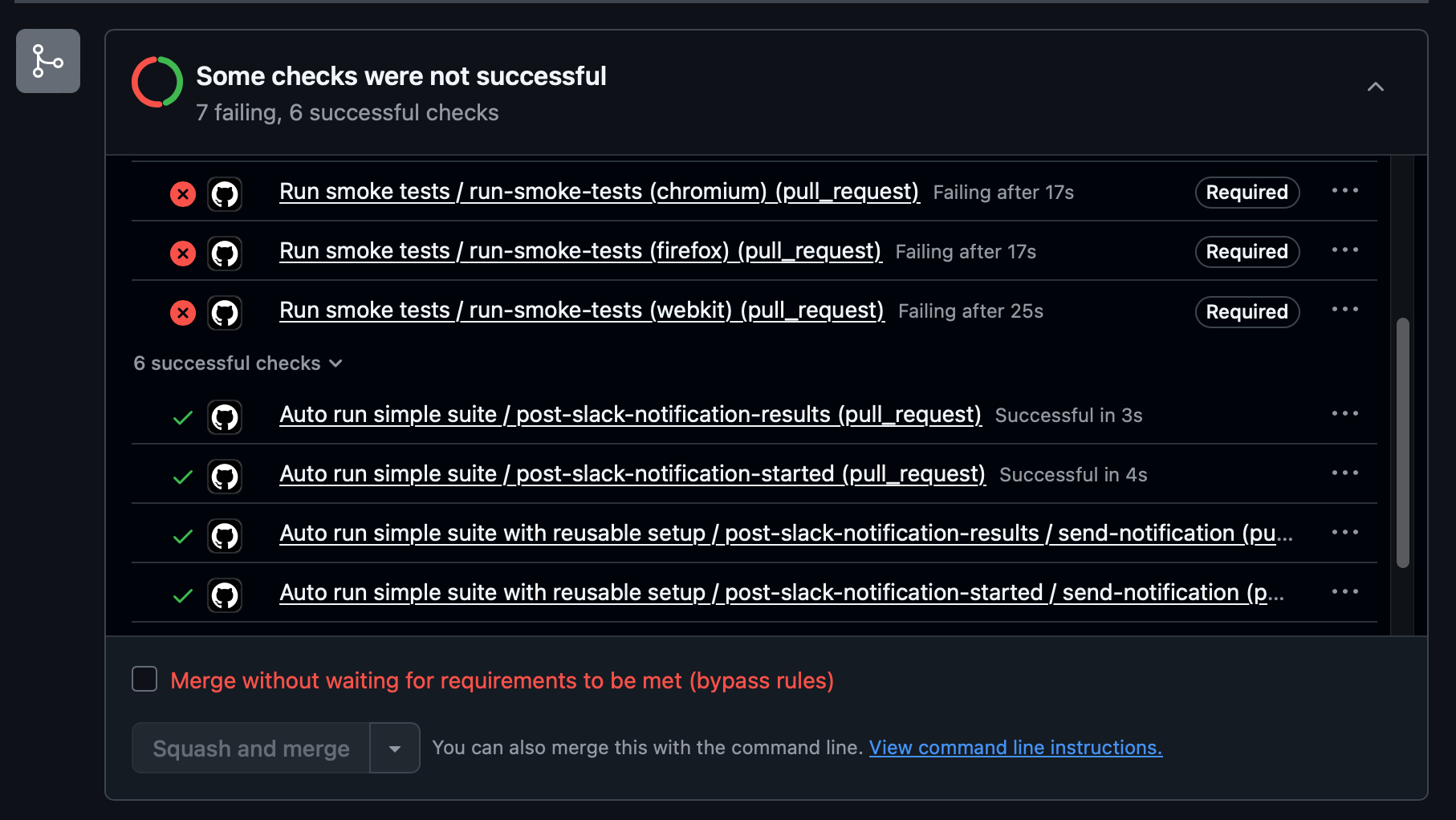
About bypass rules you can read in the official documentation.
You can test the failure of this check by changing the playwright.config.ts to an intentionally faulty configuration:
export default defineConfig({
  testDir: ‘./non-existent-tests’,
If you run the workflow now, the Run smoke tests job will fail, marking the entire pipeline (and the required check) as failed — effectively blocking the PR from merging.
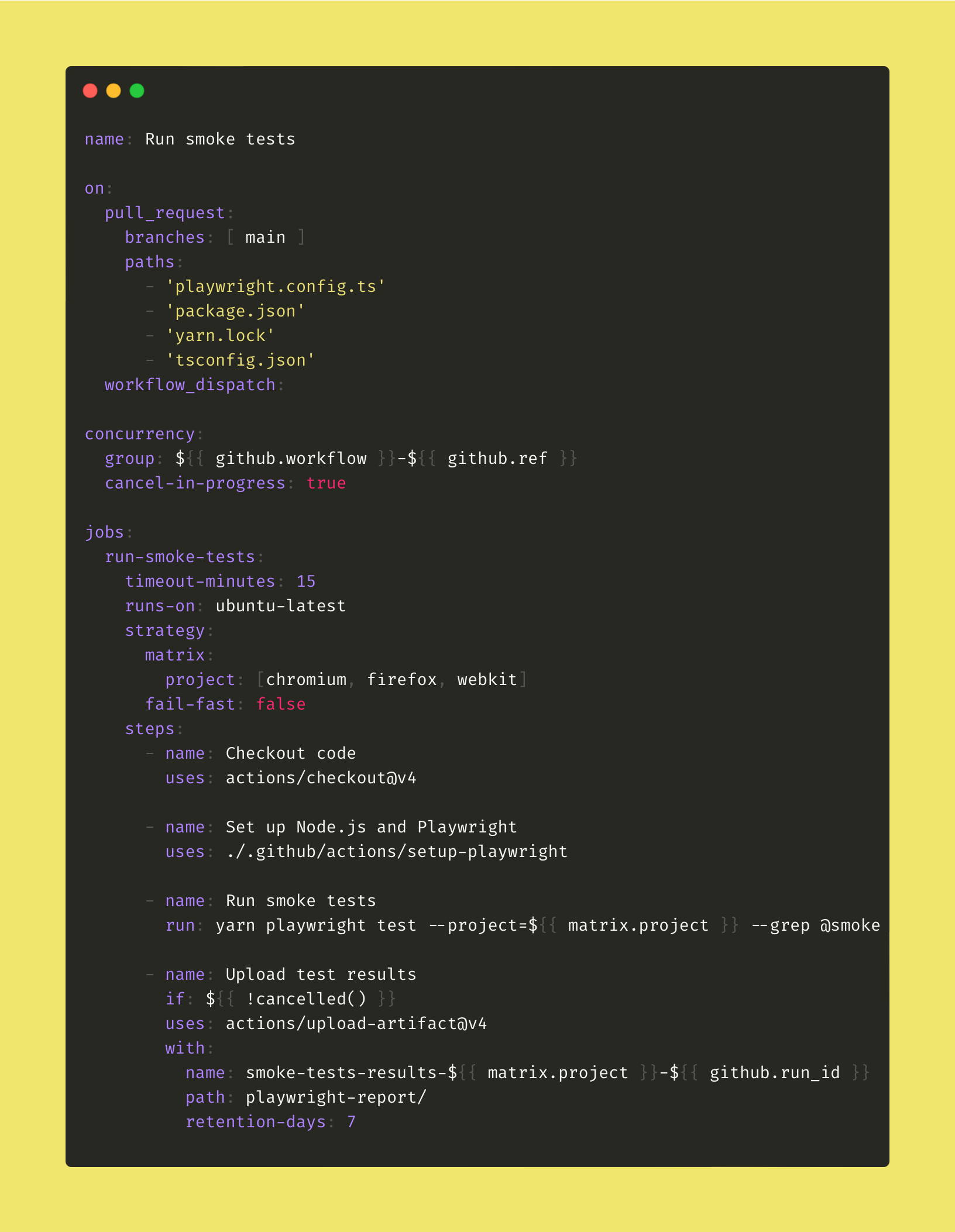
Final workflow
Recap
In this first part, we laid the groundwork for pipeline orchestration in GitHub Actions. You’ve seen how orchestration goes beyond automation — it coordinates when and how workflows run to keep feedback fast and relevant.
We explored key orchestration concepts in practice:
Triggers — controlling when workflows run and avoiding unnecessary executions.
Parallelization and concurrency — running jobs efficiently and canceling outdated runs. Matrix strategy — expanding test coverage across multiple browsers and environments in parallel.
Modularization — building predictable, reusable workflows through composite actions.
Sequencing and conditional logic — defining dependencies and execution flow with needs and if.
Quality gates — enforcing checks that block merges until essential tests pass.
Together, these techniques form the foundation of a scalable solution.
In the next part, we’ll move beyond a single workflow — connecting multiple pipelines to build a more complex end-to-end testing architecture.